MX Keys Mini vs Full-Size: Does KeyRiser Fit Both?
KeyRiser fits MX Keys Mini and full-size MX Keys / S. Compare rear-edge seating, desk footprint, travel, and how 15° can feel before you buy the same ASIN.
MX Keys Mini vs Full-Size: Does KeyRiser Fit Both the Same Way?
KeyRiser is made for the Logitech MX Keys family: the same two-foot set seats on MX Keys, MX Keys S, and MX Keys Mini. The Mini’s shorter rear edge changes how the feet sit and how the 15° lift feels, not whether the product is in or out of spec. Confirm the model name before you buy; other compact boards are not compatible.
This article is about the riser’s fit, not a verdict on which keyboard is “better.” If you are still choosing a keyboard for layout, numpad, or Mac shortcuts, start with Logitech MX Keys vs MX Keys Mini and MX Keys vs MX Keys S riser compatibility. If you already own one of the three listed boards and want to know whether ASIN B0F6QGSXHV is the right accessory, stay here.
KeyRiser is not affiliated with Logitech. Comfort with a fixed 15° rear lift is personal.
What actually differs for a riser
For a pair of rear feet, three physical facts matter more than switch marketing or backlight demos.
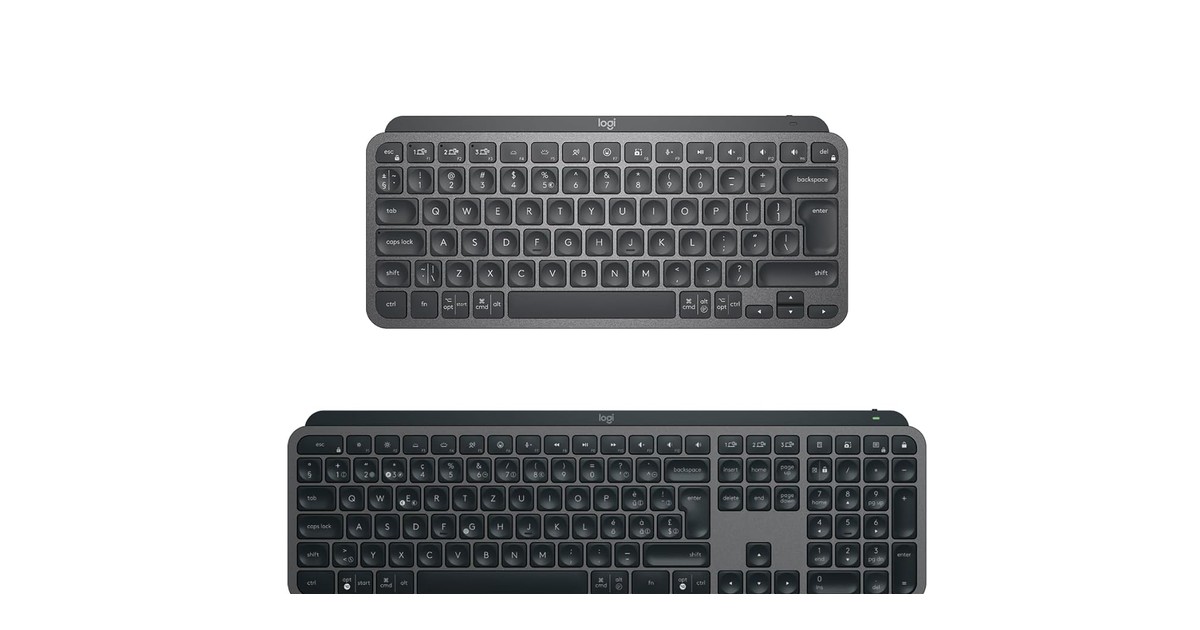
Rear-edge length. The Mini’s rear edge is shorter. Full-size MX Keys and MX Keys S share a longer rear span and a number pad. KeyRiser’s two feet still go to the two rear corners on each chassis. What changes is how much unused rear width sits between those corners, and how far the feet sit from your mouse.
Mass and footprint. Full-size is wider and heavier. Mini is lighter and easier to rotate on a small desk. A lighter board can feel more “alive” on a slick desk even when the feet are seated correctly. That is a surface and mass issue, not a different SKU.
Layout, not angle. KeyRiser’s lift is the same specified 15° rear angle on every compatible model. Mini does not get a gentler SKU. Full-size does not get a steeper one. If you want a different angle, this product is the wrong category — it is not an adjustable tray.
| MX Keys Mini | MX Keys / MX Keys S | |
|---|---|---|
| Number pad | No | Yes (full-size) |
| Rear edge | Shorter | Full width |
| Desk footprint with KeyRiser | Smallest of the three | Larger |
| Travel / bag | Mini wins | Possible, bulkier |
| KeyRiser compatible | Yes | Yes |
| Separate KeyRiser SKU? | No — same two-foot set | No — same two-foot set |
MX Keys and MX Keys S sit in the same full-size column for the riser. Wireless stack (Bolt vs Unifying) does not change how the feet seat. Confirm the name on the listing anyway; do not assume a future MX Keys generation is covered.
How KeyRiser seats on each chassis
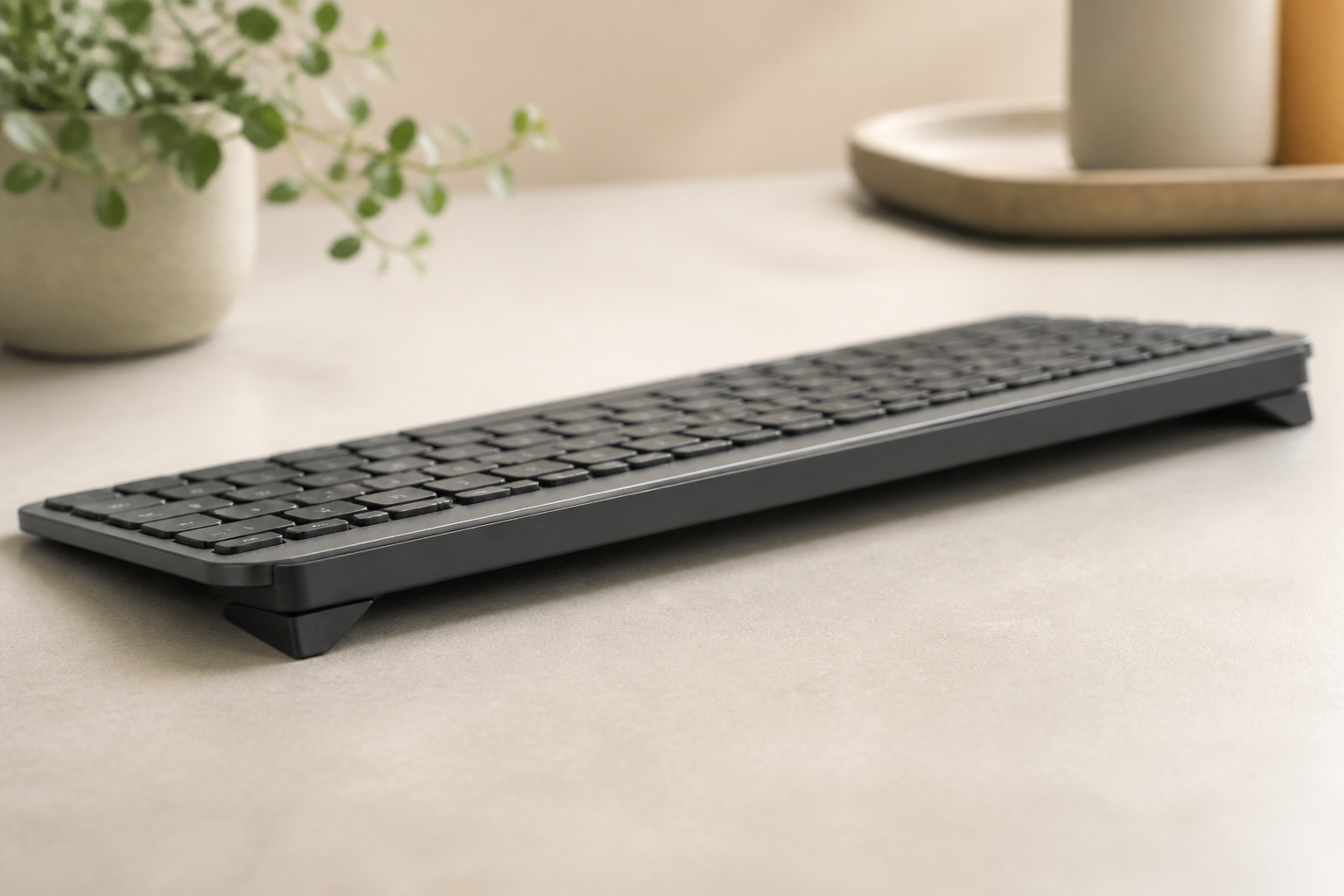
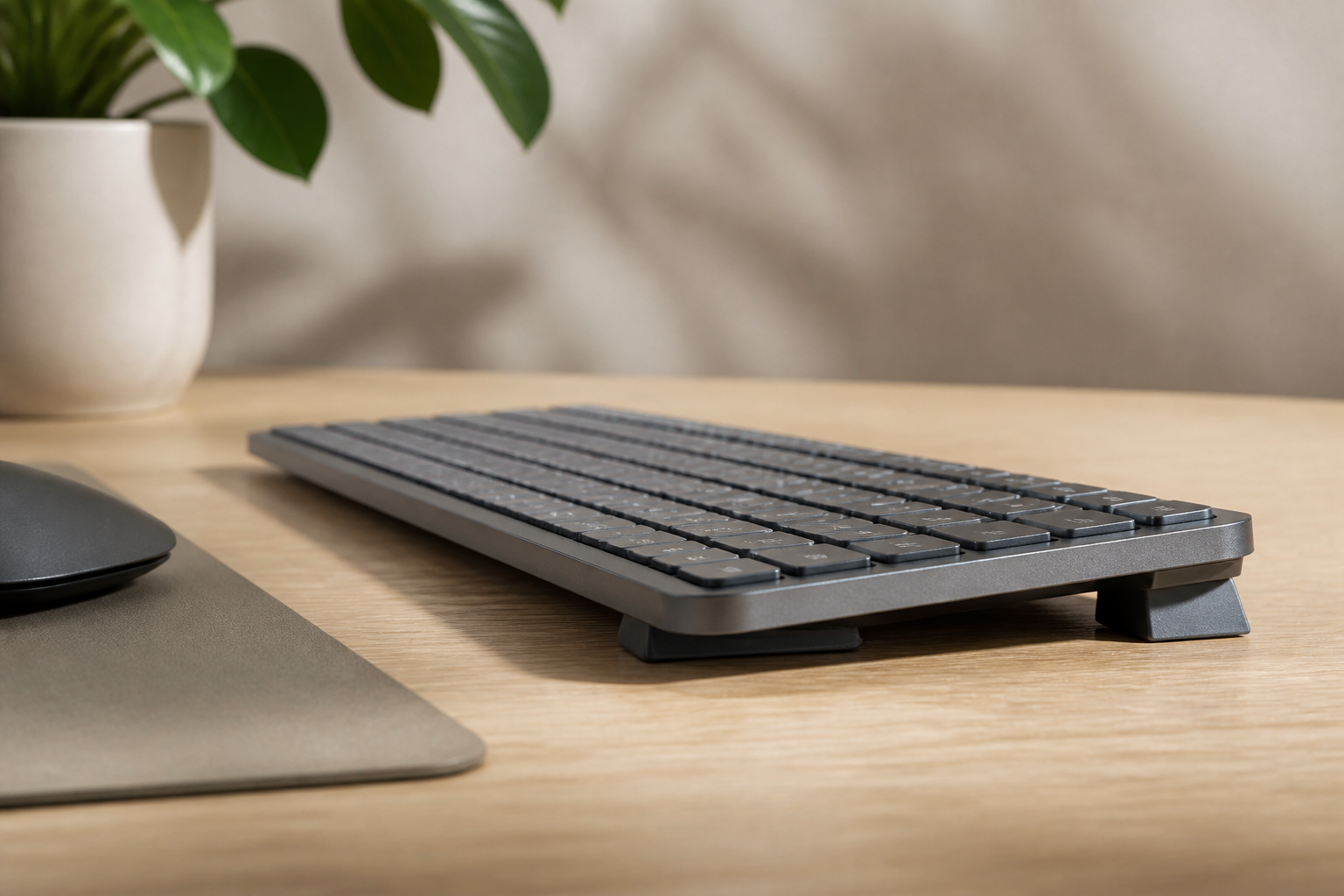
On every listed model the job is the same: two PLA feet on the rear underside, front edge toward the desk, rear edge raised. The install guide is the mechanical source of truth. Fit differences are about geometry, not a second instruction manual.
Full-size MX Keys / MX Keys S. The longer rear edge gives the feet a wide stance. The number pad sits on the raised plane with the rest of the keys. If you park a mouse to the right of the pad, the mouse line does not change just because the rear is up — only the typing surface slope changes.
Mini. The shorter rear edge means the two feet sit closer together. There is less chassis between them. A Mini-compatible design is required so the feet do not overhang a compact rear the way a generic full-size wedge might. KeyRiser lists Mini on purpose; that is the point of a model-specific set versus a universal block. For Mini-only shopping language, the existing best keyboard riser for MX Keys Mini guide is the buyer-side cousin of this fit article.
What “the same way” does not mean. It does not mean the Mini looks identical in profile photos. A shorter board with the same rear angle is a shorter ramp. Your palms, the mouse, and the desk edge will see a different silhouette. It does mean you should not buy a second ASIN, file the Mini, or skip Mini because you own full-size at work.
If a foot will not sit flush on either chassis, stop. You may have a lookalike compact that is not Mini, or a full-size that is not MX Keys. Recheck compatibility instead of forcing the part.
Desk space and travel trade-offs
Small desk. Mini + KeyRiser is the compact stack: no number pad, two small feet, no tray sliding under the desk. Full-size + KeyRiser still beats an under-desk tray for clutter, but it keeps the pad width. If the constraint is a 120 cm sit-stand top shared with a laptop stand, Mini usually wins on unused centimeters. If you live in spreadsheets, the pad may be worth the width.
Mouse reach. Raising the rear of a full-size board does not move the mouse, but it can change how your right shoulder feels if you already stretch around a number pad. Mini users often keep the mouse closer. Neither outcome is a medical claim; it is a reach diagram. Try the mouse where it already lives before you buy a new pointing device.
Travel. Two PLA feet pack with a Mini in a laptop bag in a way a folding metal stand does not. Full-size in a backpack is a different decision — the riser is still two small parts, but the keyboard is not. If you only travel with Mini, one KeyRiser pair can live in that bag. If you keep full-size at home and Mini on the road, one pair can travel with the Mini; you do not need a pair glued to each desk unless you hate reseating for sixty seconds.
Two locations. The feet move with the keyboard. That is the product shape talking, not a dual-desk manifesto. Seat, type, pack, reseat.
How 15° can feel on a short vs long board
This section is subjective. There is no study in this article, and no percentage of users who “prefer Mini.” Treat it as a desk observation.
A Mini is a shorter typing surface. The same rear lift can feel more present because your hands sit on a smaller plane and you see more of the slope in peripheral vision. A full-size board spreads the same angle over more keys, including a pad you may or may not use. Some people describe Mini + 15° as “snappier”; others barely notice once they stop looking at the side profile.
None of that means Mini is too steep or full-size is too mild. The specified angle does not change. If the slope bothers you after a correct install, that is the same adaptation question on both chassis — chair height, desk height, short sessions, and an honest return path. Use KeyRiser Feels Too Steep? rather than stacking objects under a Mini to “soften” it.
Working hypothesis — not a measured study: some Mini owners notice the side profile more on day one because the board is visually smaller. That is not a reason to skip Mini, and it is not a defect.
Model checklist before you buy
Work top to bottom. If any line fails, do not order KeyRiser for that keyboard.
- The name is exactly MX Keys, MX Keys S, or MX Keys Mini — on the box, in Bluetooth, or in Logi Options+.
- You are not looking at Wave Keys, MX Mechanical, Magic Keyboard, or an unlabeled compact.
- You understand there is one KeyRiser set for all three listed models, not a Mini SKU and a full-size SKU.
- You will seat the feet on the rear edge only (install steps).
- You accept a fixed 15° rear lift, not a tray with notches.
- You will use Amazon’s listing for price, stock, and returns — buy KeyRiser — ASIN B0F6QGSXHV.
Still shopping for the keyboard rather than the riser? That is a different article. Come back to this page after the board is in the house.
For pre-purchase geometry and materials in general, Logitech MX Keys riser feet: what to know before buying covers angle, PLA, and generic-wedge mistakes without repeating this Mini-versus-full seating table.
Common mix-ups with other compact boards
“It’s compact, so it’s a Mini.” Mini is a specific Logitech product. Compact mechanical boards, older Logitech K-series, and Apple’s small keyboards are not Mini. KeyRiser will not magically become universal because the desk is small.
“S is smaller than MX Keys.” MX Keys S is the full-size successor in the same chassis family for this accessory. Mini is the compact one. S versus original MX Keys is a wireless/layout nuance, not a Mini decision. See the S compatibility guide.
“I’ll buy generic Mini feet and use them on full-size.” You do not need a second geometry if you stay inside the three listed models. You do need to stay inside those models.
“Full-size feet will be more stable on Mini.” Stability comes from a seat that matches the rear underside, not from bigger leftover plastic. Overhang is how compact boards rock.
“I’ll 3D-print a longer bar.” That is a different product. This page only describes the two-foot KeyRiser set.
Buy now vs wait
Buy now if you already own a listed MX Keys, MX Keys S, or Mini, you want a compact rear lift instead of a new split keyboard, and you are willing to return through Amazon if the 15° slope is not for you.
Wait if you do not know the model name, you are waiting on a rumored future MX Keys, or you actually need an adjustable tray or a split layout. KeyRiser will not become those things. Do not order it as a placeholder for a keyboard you have not bought.
When the checklist is green, the conversion path is short: compatibility → product page → Amazon.
Fit FAQ
Does KeyRiser fit MX Keys Mini?
Yes. Mini is a listed model. The shorter rear edge is why Mini is named explicitly instead of being lumped into “most compact keyboards.”
Do I need a different SKU for Mini vs full-size?
No. One two-foot set is specified for MX Keys, MX Keys S, and MX Keys Mini. Confirm the Amazon listing still names all three before you pay; do not assume a random third-party wedge is the same part.
Will full-size feet overhang the Mini?
Generic full-size wedges often do. A Mini-listed, model-specific pair is designed not to treat Mini as an afterthought. If a foot hangs off the rear corner, you are not on a correct Mini seat — remove it.
Can I use KeyRiser on a non-MX compact keyboard?
No. Compact is not a compatibility class. If the name is not one of the three, skip the ASIN.
Does MX Keys S need different feet from original MX Keys?
Not for KeyRiser’s stated fit. Both are full-size family chassis for this accessory. Still match the printed model name.
Is the 15° angle lower on Mini?
No. The lift is the same specified rear angle. Feel can differ because the board is shorter. That is perception and desk context, not a second product.
KeyRiser is an accessory for three named Logitech keyboards, sold on Amazon. It is not affiliated with Logitech and is not a medical device. If a setup change leaves you with pain, numbness, or tingling that does not settle, speak with a qualified health professional.
Ready for a Better Typing Angle?
Check KeyRiser on Amazon and confirm compatibility with your MX Keys model.
Buy Now - $9.99