As an Amazon Associate, we earn from qualifying purchases.
Keyboard Tilt Reference Data
A small, stable dataset for keyboard tilt: how many millimetres the rear edge rises at a given angle and keyboard depth, the formula behind it, the published guidance it sits next to, and a citation-ready format.
The short answer
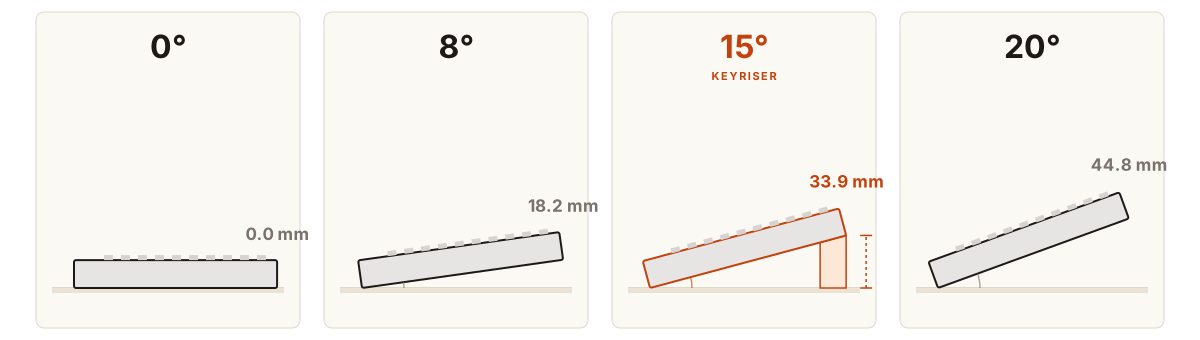
A 15° rear lift raises the rear edge of a 131 mm deep Logitech MX Keys by 33.9 mm. The rise equals the keyboard depth multiplied by the sine of the tilt angle, so a deeper board needs a taller lift to reach the same angle.
Last updated:
Rear-edge rise by keyboard depth and angle
Values in millimetres, rounded to one decimal. Rows are keyboard depths; columns are tilt angles. The 15° column is the fixed lift KeyRiser delivers.
| Keyboard depth | 5° | 8° | 10° | 12° | 15° KeyRiser | 18° | 20° |
|---|---|---|---|---|---|---|---|
| 115 mm | 10 mm | 16 mm | 20 mm | 23.9 mm | 29.8 mm | 35.5 mm | 39.3 mm |
| 116 mm | 10.1 mm | 16.1 mm | 20.1 mm | 24.1 mm | 30 mm | 35.8 mm | 39.7 mm |
| 131 mm | 11.4 mm | 18.2 mm | 22.7 mm | 27.2 mm | 33.9 mm | 40.5 mm | 44.8 mm |
| 132 mm | 11.5 mm | 18.4 mm | 22.9 mm | 27.4 mm | 34.2 mm | 40.8 mm | 45.1 mm |
Want the 15° column without building it? KeyRiser holds Logitech MX Keys at a fixed 15°. See the riser on Amazon
What the tilt looks like
Method
Each value uses the same formula: rear rise = keyboard depth × sin(tilt angle). The keyboard is treated as a rigid board that rotates about its front edge. Case height, keycap height and riser thickness are not included, because the calculation describes only the additional rise created by the tilt.
The depths in the table are the published case depths used in the low-profile keyboard guide: 115 mm (Apple Magic Keyboard, compact), 116 mm (Keychron K3 Pro), 131 mm (Logitech MX Keys and MX Keys S, full-size) and 132 mm (Logitech MX Keys Mini, NuPhy Air75 V2). Measure your own board if it is not listed; the formula works for any depth.
KeyRiser product facts used above
- Rear lift
- Fixed 15°
- Pack
- Two riser feet
- Material
- PLA plastic, 3D printed
- Compatible models
- Logitech MX Keys, MX Keys S and MX Keys Mini
Quote-ready findings
- At a 15° tilt, the rear edge of a 131 mm deep Logitech MX Keys sits 33.9 mm above the front edge.
- Every additional 10 mm of keyboard depth adds about 2.6 mm of rear rise at 15°.
- A 20° tilt raises the rear edge of a 131 mm keyboard by 44.8 mm, 10.9 mm more than the same board at 15°.
Published guidance nearby
The dataset is geometry, not a clinical finding. The sources below are the workplace guidance this site cites when it discusses keyboard position and wrist posture.
How to cite this page
Cite the page or download the CSV. The URL is permanent and the table is updated in place, so an existing citation keeps resolving when rows are added.
Suggested citation: KeyRiser. “Keyboard Tilt Reference Data.” keyriser.com/research/keyboard-tilt-data. Frequently asked questions
How do you calculate keyboard tilt height?
Multiply the keyboard depth by the sine of the angle. A 131 mm keyboard at 15° gives 131 × 0.2588 = 33.9 mm of rear rise.
Is 15 degrees too much keyboard tilt?
It depends on the board and the setup. Fifteen degrees is the upper end of the 8°–15° range the riser guide suggests for low-profile keyboards; above that the keyboard can push the forearms back. Try it and adjust.
Do these numbers apply to a keyboard with built-in feet?
The table gives the additional rise produced by the tilt. Built-in feet add their own lift on top, so measure from the desk to the rear edge to capture the total you actually have.
Put the number to work
KeyRiser adds the 15° column to Logitech MX Keys, MX Keys S and MX Keys Mini as a fixed, repeatable rear lift.
Geometry only. KeyRiser is an accessory, not a medical device. Persistent pain, numbness or tingling should be discussed with a qualified healthcare professional.