Which Logitech MX Keys Do You Have? Model ID and Riser Fit
Not sure which Logitech MX Keys you own? Identify MX Keys, MX Keys S, or MX Keys Mini in about a minute, then confirm a keyboard riser will actually fit.
Which Logitech MX Keys Do You Have? Model ID and Riser Fit
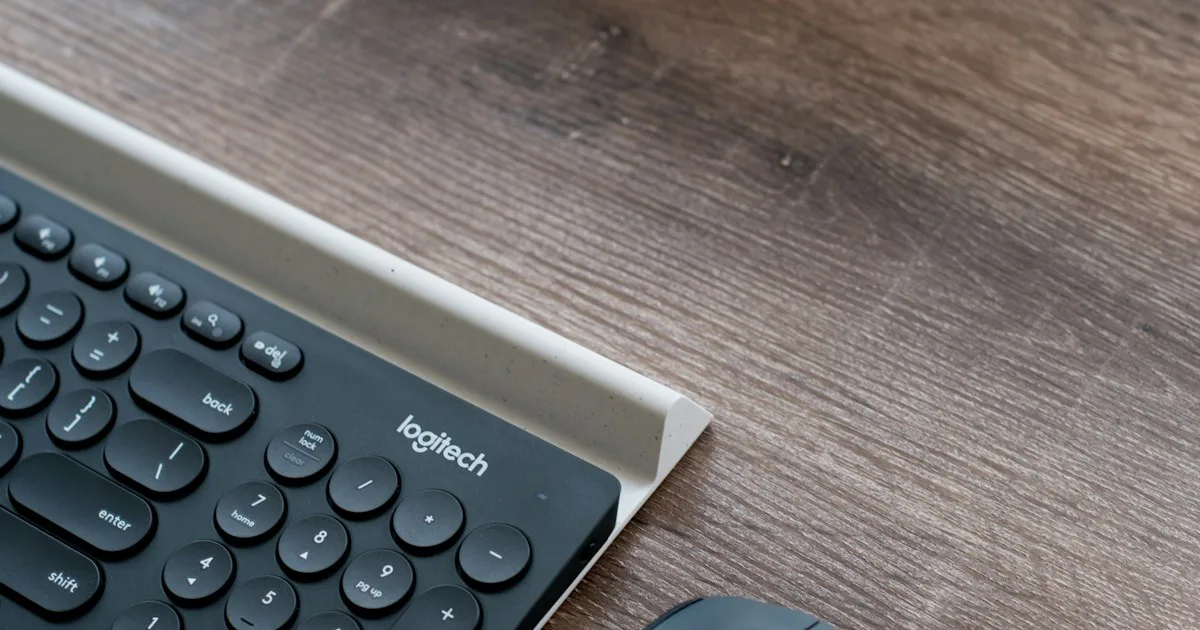
Short answer: Logitech sells three keyboards under the MX Keys name: the full-size MX Keys, the full-size MX Keys S, and the compact MX Keys Mini. KeyRiser — a pair of rear riser feet — is specified for exactly those three. If you can read the model name on the box, in Bluetooth settings, or in Logi Options+, you already know whether it fits. If you cannot, the number pad and the keyboard’s width will tell you in about a minute.
This page exists because “I have an MX Keys” is not specific enough to buy a model-specific accessory. A riser that is shaped for the MX Keys rear edge is not a universal wedge, and the most common avoidable return is someone ordering for a keyboard they do not actually own. Before you order anything, confirm the name, then confirm the fit.
KeyRiser is an independent accessory. It is not affiliated with, endorsed by, or sponsored by Logitech. The keyboard is not included.
Why the exact model name decides the purchase
Generic keyboard stands are sold as “fits most keyboards.” Model-specific riser feet are not. KeyRiser is two matte-black PLA parts that seat on the rear underside of one chassis family. That narrow design is what keeps the footprint small and the install tool-free — but it also means the keyboard’s identity matters more than its size category.
The practical consequences are simple:
- Order for a listed model and the feet seat on the rear corners with a firm push.
- Order for an unlisted model and the feet either will not sit flush or will not grip correctly, which reads as “wobble” or “defective” when the real problem is the wrong chassis.
- Guess wrong and the cleanest fix is an Amazon return for an unused set, not a home repair.
So the order of operations is: identify the keyboard, check that the name is supported, then buy. Not the reverse.
Three names, one family
Logitech’s MX Keys line is easy to mix up because the products share a look: a low profile, a metal top plate, and soft, backlit square keys. The compatible set is:
| Name | Layout | Number pad | KeyRiser |
|---|---|---|---|
| Logitech MX Keys | Full-size | Yes | Supported |
| Logitech MX Keys S | Full-size | Yes | Supported |
| Logitech MX Keys Mini | Compact | No | Supported |
The original MX Keys and the MX Keys S share the full-size footprint, so the same pair of feet covers both. The MX Keys Mini is the same product family in a shorter chassis, and it is also supported; the shorter rear edge changes how the feet sit and how the fixed rear lift feels, not whether the product is in spec.
A fourth trap is the keyboard you did not buy. Logitech also makes the MX Mechanical (a low-profile mechanical keyboard), the MX Keys for Mac name variant, and the Wave Keys. Those are different products. “It looks like an MX Keys” is not the same as “it is an MX Keys,” and the compatibility list is limited to the three names above.
How to identify your keyboard in about a minute
Work down these checks in order. The first one that gives you a definite answer is your answer.
1. Look for the number pad
This is the fastest split. If the keyboard has a number pad on the right, you have a full-size MX Keys or MX Keys S. If there is no number pad — just the main typing area plus a short row of function and navigation keys — you have the MX Keys Mini. There is no full-size MX Keys without a number pad and no Mini with one, so this check is reliable on its own for separating Mini from full-size.
2. Read the model string in Bluetooth or Logi Options+
Pair the keyboard, then open the device list. On most systems the Bluetooth settings screen shows a device name such as “MX Keys,” “MX Keys S,” or “MX Keys Mini.” Logitech’s own Logi Options+ software shows the connected device name as well. This is the closest thing to a definitive answer, because it is the hardware reporting its own name rather than a memory of what the box said.
If the name is one of the three listed models, stop here — you have your answer.
3. Check the underside label
Flip the keyboard over. Logitech prints a regulatory label on the underside that includes the product name and a model number, usually in the format Y-R00xx. Compare that printed name with the compatibility list. This is useful when you no longer have the box or the keyboard is unpaired.
4. Use the width as a tiebreaker only
If the name is worn off and you cannot pair the keyboard, the width will separate the compact model from the full-size ones. A full-size MX Keys is roughly 43 cm wide; an MX Keys Mini is roughly 30 cm wide. Treat these as approximate guideposts for distinguishing the two sizes, not as a fit specification, and confirm against Logitech’s own documentation if the number is close.
Width alone cannot separate the MX Keys from the MX Keys S — those two share a full-size layout — but it does not need to, because both are supported.
What KeyRiser supports, and what it does not
Once the name is confirmed, the compatibility rules are short.
Supported: Logitech MX Keys, Logitech MX Keys S, Logitech MX Keys Mini.
Not supported: MX Mechanical and MX Mechanical Mini, Wave Keys, K-series Logitech keyboards, Apple Magic Keyboard, laptop keyboards, other brands, and any “compact keyboard that looks similar.”
If your keyboard is not on the supported list, do not order KeyRiser hoping it will work. The product page and the compatibility guide name the three models deliberately. The feet are shaped for those rear edges, and forcing a near-fit is how chassis get scuffed and returns get opened for the wrong reason.
What you are buying once the model fits
For a supported keyboard, KeyRiser is a compact, fixed-angle accessory:
- Two separate rear feet, not a full-width tray or platform.
- A fixed 15° rear lift that raises the keyboard’s back edge.
- Matte-black PLA, 3D printed, with a low visual footprint.
- Tool-free setup — two hands, no adhesive, no screws.
- Keyboard not included. You are buying the riser feet for a keyboard you already own.
It changes the keyboard’s rear-edge height and angle. It does not lower a desk, make a fixed tray adjustable, or turn an unlisted keyboard into a compatible one. The current material and shape details live on the specifications page.
Fit is not the same as comfort
A supported keyboard means the feet will seat. It does not guarantee that you will like the result. A flat MX Keys that suddenly sits on a 15° rear lift is a real change, and some people find it comfortable while others do not. That preference is not a compatibility problem, and it is not a defect. If you want to understand the angle before ordering, the riser feet buying guide walks through what the fixed rear lift does and does not change, and the install guide shows the actual seating steps.
If you are weighing the riser against changing the keyboard, it helps to know why the MX Keys family ships flat in the first place. The no-adjustable-feet explainer covers that context without pretending the riser is the only option.
When a riser is the wrong purchase
Do not buy KeyRiser if any of the following is true:
- Your keyboard is not one of the three supported names. Check compatibility rather than assuming.
- You want an adjustable angle. KeyRiser is a fixed 15° rear lift. If you need to dial the angle up and down, an adjustable stand or a different keyboard layout is the correct category.
- You actually want a tray that lowers the keyboard under the desk, or a full keyboard platform. That is a different product with a different job.
- You are buying it as a placeholder for a keyboard you have not chosen yet. Pick the keyboard first; the accessory follows.
Buying the right category matters more than buying quickly. A model-specific rear riser solves one narrow problem well. It is a poor substitute for products that solve other problems.
FAQ
How do I know which MX Keys I have?
Read the device name in Bluetooth settings or Logi Options+, or the printed name on the underside label. If you cannot, the number pad separates the Mini (no number pad) from the full-size models (number pad). The Mini is also noticeably narrower.
Does KeyRiser fit all three MX Keys models?
Yes. KeyRiser is specified for Logitech MX Keys, MX Keys S, and MX Keys Mini. The same pair covers the two full-size models and the compact Mini.
Is the MX Keys S the same size as the MX Keys?
They share the full-size layout and footprint, so the same riser feet seat on both. Confirm the name anyway, because the two are easy to confuse visually.
Will it fit MX Mechanical or Wave Keys?
No. Those are different keyboards and are not on the supported list. Do not force a near-fit; check compatibility and choose an accessory that names your actual keyboard.
Can I return it if I ordered for the wrong keyboard?
Purchase, stock, shipping, and returns are handled by the Amazon order, not by KeyRiser directly. If the set is unused and in returnable condition, use Amazon’s return flow. Reading the model name first is the cheaper fix.
Do I need tools or adhesive to install it?
No. A correct install on a supported keyboard is a firm push of each foot onto a rear corner, followed by a press-test for wobble. Adhesive is a workaround for the wrong product or the wrong surface, not part of setup.
Bottom line
Identify the keyboard before you buy anything shaped for it. Read the name in Bluetooth or Logi Options+, check the underside label, or use the number pad and width to separate Mini from full-size. If the name is Logitech MX Keys, MX Keys S, or MX Keys Mini, KeyRiser will seat on the rear edge — then the only remaining question is whether a fixed 15° rear lift suits how you type. If the name is anything else, the honest answer is that this accessory is not for that keyboard. When the model checks out, confirm the current details on the product page or go straight to the purchase page.
This article is educational and is not medical advice. KeyRiser is an independent accessory and is not affiliated with Logitech. If you experience persistent pain, numbness, tingling, or weakness, consult a qualified health professional.
Ready for a Better Typing Angle?
Check KeyRiser on Amazon and confirm compatibility with your MX Keys model.
Buy Now - $9.99Related Articles



Complete your MX Keys setup
KeyRiser first, then the desk complements
KeyRiser addresses keyboard angle. These recommendations cover adjacent setup needs without replacing it.