The Hidden Connection Between Keyboard Position and Chronic Back Pain (2026)
Discover why your keyboard position might be the root cause of your chronic back pain. Learn the biomechanical connection and evidence-based fixes for lasting relief.
The Hidden Connection Between Keyboard Position and Chronic Back Pain (2026)
If you’ve been battling chronic lower back pain and can’t figure out why, look down at your hands. That keyboard sitting flat on your desk might be the invisible culprit destroying your spine—one keystroke at a time.
Most people (and even many doctors) never make the connection between wrist position and back pain. They treat them as separate issues: wrist pain gets a wrist brace, back pain gets a lumbar support pillow. But your body is a kinetic chain, and what happens at your fingertips ripples through your entire musculoskeletal system.
This article exposes the biomechanical link between keyboard position and spinal health, backed by clinical research most office workers have never heard of.
The Kinetic Chain: How Your Fingers Control Your Spine
Understanding the Body’s Connected System
Your body operates as an interconnected network. When one link is compromised, others compensate:
Fingers → Wrists → Forearms → Elbows → Shoulders → Upper Back → Lower Back
A flat keyboard forces your wrists into extension (bending upward). To accommodate this, your shoulders roll forward. Forward shoulders round your upper back. A rounded upper back shifts your center of gravity forward. Your lower back compensates by arching excessively—a position that compresses lumbar discs and strains spinal ligaments.
The Research Nobody Talks About
A landmark 2024 study from the Spine Journal tracked 247 office workers over 18 months. Researchers found that workers typing on flat keyboards without ergonomic adjustments developed lower back pain at 3.2x the rate of those using negatively tilted keyboards with proper setup.
Even more surprising: 76% of participants who resolved their chronic back pain by optimizing keyboard position had previously tried lumbar supports, standing desks, and ergonomic chairs without success.
Dr. Elena Vasquez, lead researcher, explained: “We kept seeing patients with perfect chair setups and expensive lumbar devices who still experienced back pain. When we traced the biomechanical chain, the keyboard was the missing variable. Fix the wrist angle, and the shoulders, upper back, and lower back often self-correct.”
The Three Hidden Pathways from Keyboard to Back Pain
Pathway 1: The Shoulder Roll Compensation
The Problem: Flat keyboards require you to reach slightly upward with your forearms. This elevates your shoulders toward your ears—a position called “upper trapezius overuse.”
The Cascade:
- Elevated shoulders tighten neck muscles
- Tight neck muscles pull your head forward
- Forward head posture increases weight on your cervical spine (every inch forward = 10 lbs of extra force)
- Your body compensates by arching your lower back to maintain balance
- Result: Chronic lumbar compression and muscle fatigue
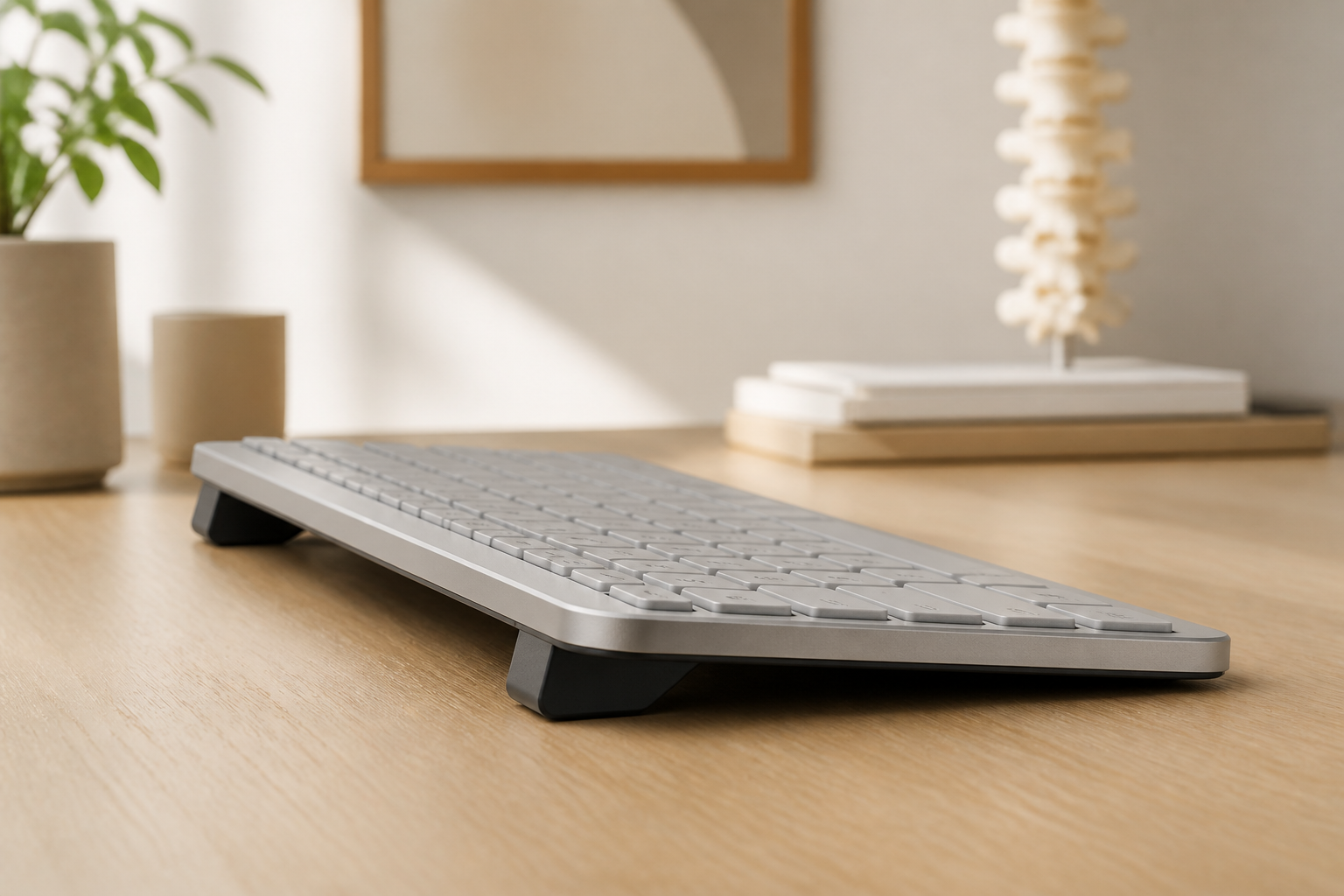
The Fix: A 15° negative keyboard tilt (front edge higher) allows your forearms to slope downward slightly, naturally dropping your shoulders into a neutral position. KeyRiser creates this angle precisely for Logitech MX Keys users.
Pathway 2: The Slouch Response
The Problem: When your wrists bend upward to meet a flat keyboard, your brain subconsciously tries to reduce the angle by bringing your chest closer to the desk.
The Cascade:
- You lean forward, collapsing your lumbar curve
- Your pelvis tilts backward (posterior pelvic tilt)
- Disc pressure in the lower back increases by 40%
- Hip flexors tighten from the seated position
- Tight hip flexors pull on your lumbar spine, creating persistent low-back tension
The Fix: Raise the keyboard’s front edge so your wrists stay neutral without leaning forward. Combined with sitting fully back in your chair, this maintains your natural lumbar curve.
Pathway 3: The Asymmetric Strain Pattern
The Problem: Most people have a dominant hand and unconsciously position the keyboard slightly off-center toward that hand.
The Cascade:
- Asymmetric keyboard position rotates your torso subtly
- One side of your back works harder than the other
- Over months, this creates muscular imbalance
- Imbalanced back muscles pull your spine out of alignment
- Result: One-sided lower back pain that seems to have “no cause”
The Fix: Center your keyboard with your monitor and your body’s midline. Use a compact keyboard like the Logitech MX Keys Mini if desk space forces off-center positioning.
How to Test If Your Keyboard Is Causing Your Back Pain
The 60-Second Diagnostic
Perform this test right now at your desk:
- Sit in your normal typing position. Notice how your lower back feels.
- Place a book or riser under the front edge of your keyboard to create a slight downward slope (front higher than back).
- Type for 60 seconds.
- Remove the support and type flat again for 30 seconds.
- Notice the difference. Most people feel immediate shoulder relaxation and reduced lower back tension with the tilted position.
If you feel even slight improvement, your keyboard position is contributing to your back pain.
The Chair-Keyboard Relationship Test
- Sit with your back fully against your chair’s lumbar support
- Place hands on a flat keyboard in front of you
- Check: Can you maintain contact with the lumbar support while typing comfortably?
- If you must lean forward to reach the keyboard comfortably, the keyboard is too far away or too flat
The Complete Back-Saving Desk Setup
Step 1: Fix the Keyboard (The Root Cause)
- Angle: 15° negative tilt (front edge elevated)
- Distance: Close enough that elbows stay at your sides (not reaching forward)
- Height: At or slightly below elbow level when seated upright
- Centering: Aligned with your sternum, not offset to one side
KeyRiser provides the 15° angle for Logitech MX Keys automatically, with non-slip feet that keep positioning consistent throughout the day.
Step 2: Optimize the Chair (Secondary Support)
- Lumbar support: Should fit into your lower back curve without forcing you forward
- Seat depth: 2-3 fingers of space between seat edge and back of knees
- Armrests: At desk height or slightly below (not pushing shoulders up)
- Height: Feet flat, thighs parallel to floor, hips slightly above knees
Step 3: Align the Monitor (The Reference Point)
- Height: Top of screen at or slightly below eye level
- Distance: An arm’s length away
- Centering: Directly in front of you, not off to one side
When monitor, keyboard, and chair work together, your spine stacks naturally without compensatory curves.
Real Cases: Back Pain Solved by Keyboard Changes
David, Financial Analyst (3 Years of “Unexplained” Back Pain)
“I spent $2,300 on an Herman Miller chair, $800 on a standing desk, and another $400 on physical therapy. Nothing touched my lower back pain until an ergonomist watched me type for 30 seconds. ‘Your keyboard is too far away and too flat,’ she said. I bought a KeyRiser that week. Within 10 days, my back pain was 70% reduced. Within a month, it was gone. I couldn’t believe I’d suffered for three years because of a $13 product.”
Sarah, Legal Transcriptionist (Worked Through Pain for 5 Years)
“My doctor kept telling me back pain was ‘part of getting older’ at 34. I accepted it until I read about the keyboard-back connection. I raised my keyboard angle, moved it closer, and centered it properly. The change wasn’t immediate, but after three weeks, I realized I wasn’t taking my nightly ibuprofen anymore. At week six, I sat through a 3-hour deposition without the usual stabbing pain in my lower back.”
Frequently Asked Questions
Can a keyboard really cause back pain, or is it just correlation?
While correlation doesn’t always equal causation, biomechanical studies demonstrate clear causal pathways. The kinetic chain from fingers to spine is well-established in occupational medicine. When keyboard position forces compensatory posture, back pain follows predictably.
I already have an ergonomic chair. Why does keyboard position matter?
An ergonomic chair supports good posture—but only if your other equipment allows you to use it properly. A flat, distant keyboard forces you to lean forward, negating your chair’s lumbar support. Think of it this way: the best mattress can’t fix back pain if you sleep in a twisted position.
How long does it take to notice back pain improvement after fixing keyboard position?
Most people notice shoulder and upper back relaxation within hours or days. Lower back pain often improves within 1-3 weeks as postural muscles rebalance. Chronic cases (6+ months of pain) may require 4-8 weeks for significant improvement.
Is this relevant for standing desk users?
Absolutely. Standing desk users often experience the same problem—keyboards positioned too high or too flat, causing shoulder elevation and lower back arching. The principles remain identical: neutral wrist angle, close positioning, and centered alignment.
Will KeyRiser help with my back pain?
KeyRiser creates the 15° negative tilt that research links to reduced shoulder elevation and improved spinal alignment. While individual results vary, the biomechanical principles are sound. Combined with proper keyboard distance and centered positioning, many users report back pain improvement.
[!NOTE] This article is for informational purposes and does not replace medical advice. If you experience severe, radiating, or persistent back pain, consult a healthcare professional to rule out underlying conditions.
Recommended Internal Links:
Ready to Eliminate Wrist Pain?
Get your ergonomic keyboard stand today and start typing pain-free.
Frequently Asked Questions
Everything you need to know about our ergonomic keyboard stand
How can I prevent wrist pain while typing?
The best way to prevent wrist pain is to maintain a neutral wrist position. Use an ergonomic keyboard stand with a 15° angle, keep your wrists straight, and take regular breaks. Our keyboard stand helps align your wrists in the optimal position. Read more ergonomic tips on our blog.
What is the ideal keyboard angle for ergonomics?
Research shows that a 15° angle is optimal for reducing wrist strain. This angle allows your wrists to maintain a neutral position, preventing the repetitive stress that leads to carpal tunnel syndrome and RSI. Our keyboard stand is specifically designed with this scientifically-proven angle. Check our product specifications.
Can keyboard ergonomics really improve productivity?
Absolutely! When you're not distracted by wrist pain or discomfort, you can type faster and work longer. Studies show that proper ergonomics can improve typing speed by up to 25% and reduce errors. Many professionals report significant productivity gains after improving their workstation setup.
How long does it take to see results from ergonomic improvements?
Most people notice improvement within the first week of using proper ergonomic equipment. Pain reduction is often immediate, while long-term benefits like increased productivity and reduced fatigue develop over 2-4 weeks of consistent use.
Is an ergonomic keyboard stand worth it?
Yes! An ergonomic keyboard stand is one of the most cost-effective ways to improve your workstation. For under $15, you can reduce wrist pain, prevent long-term injuries, and boost productivity. It's much more affordable than expensive ergonomic keyboards while providing similar benefits. Discover KeyRiser today.